


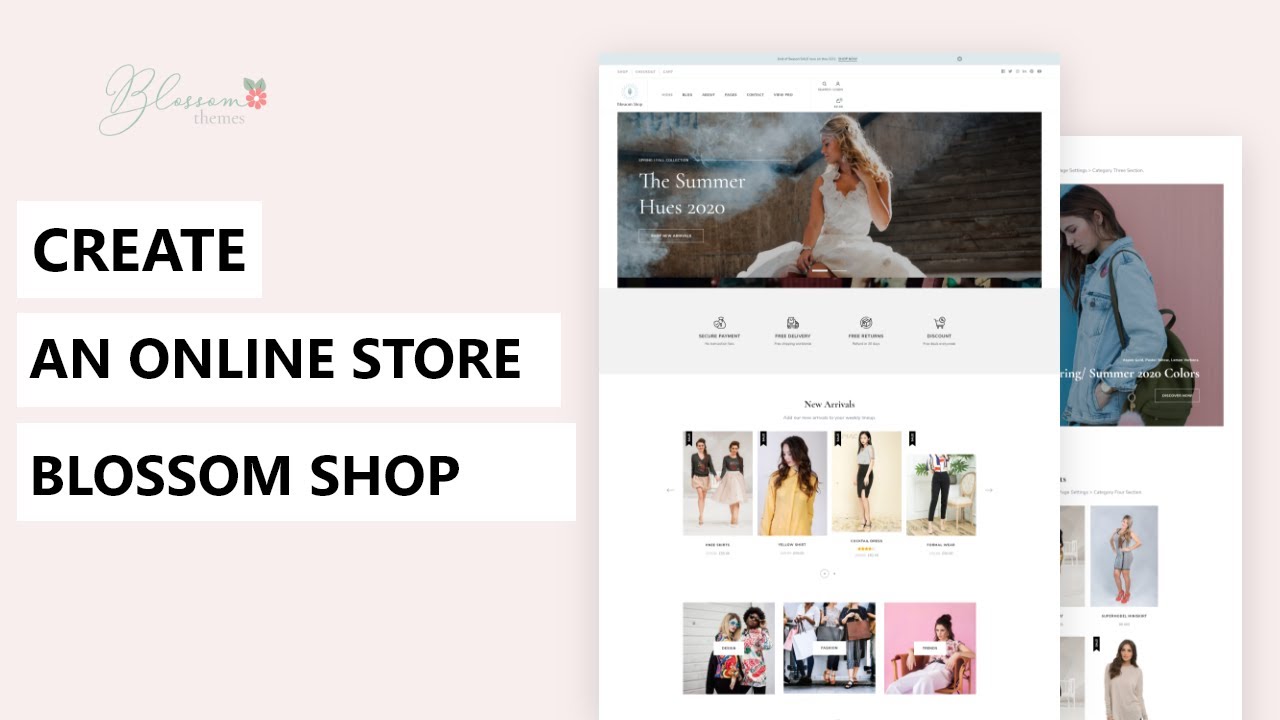
In this tutorial, you will learn how you can easily start your very first Online Store using Blossom Shop free and Pro WordPress theme. Even if you are a beginner you can easily follow this step-by-step tutorial and start selling online right away very easily.
✅ Compatible with WooCommerce Plugin
✅ Clean and Powerful Homepage Design
✅ Hide/Show Sale Ribbon On Product
✅ Mega Menu Compatible
✅ Social Media Integration
✅ Display Similar Products On Your Product Page And Increase Your Sales
✅ Always Keep Updated
✅ No Coding
✅ Free Support And Many More
The tutorial covers everything that you need to get your site up and ready and if we have missed out on anything do let us know in the comments section below.
———————————————————————————————–
Blossom Shop Free Text Documentation:
Download Blossom Shop Free Version over here:
Get Blossom Shop (Pro Version) WordPress Theme over here:
Please use the images of the following sizes (in px) with the Blossom Shop theme.
Blossom-shop-schema : 600 X 60
Blossom-shop-blog : 829 X 623
Blossom-shop-blog-full : 1220 X 623
Blossom-shop-blog-list : 398 X 297
Blossom-shop-slider : 1751 X 726
Blossom-shop-featured : 860 X 860
Blossom-shop-featured-one : 860 X 415
Blossom-shop-featured-two : 423 X 617
Blossom-shop-featured-three : 865 X 1030
Blossom-shop-recent : 540 X 810
Blossom-shop-recent-two : 420 X 472
———————————————————————————————
How to Create Posts or Pages Using Gutenberg Editor:
How to add Newsletter Section To Your Website/BlossomThemes Email Newsletter:
How to add Instagram Section To Your Website:
How to Configure Menu Section:
———————————————————————————————-
0:00 – Introduction
00:50 – About Blossom Shop Free Theme
8:21 – About Blossom Shop Pro Theme
16:30- Download/Install/Activate Blossom Shop Free Theme
18:31- Blossom Shop Free Customizer Tour (Short & Quick)
22:32- Create Site Identity
27:46- Add Social Media Links
29:38- Configure Header Items
32:52- Create Your First Post
37:28- Homepage Settings
39:20- Banner Section Configuration
44:04- Service Section Configuration
46:51-Featured Section Configuration
50:09- About Section
52:39- Testimonial Section
54:58- Call To Action Section
57:08- Blog Section
57:41-Client Logo Section
59:35- Create Your First Product/ A Shop Section
1:02:30- Recent Product Section Configuration
1:04:05- Category One Section
1:06:38- Configure Navigation Menu
1:11:07- Appearance Settings
1:16:08- Layout Settings
1:16:52- Sidebar Layout Settings
1:25:14- SEO Settings
1:26:28- Posts (Blog) & Pages Settings
1:31:35- Instagram Settings
1:34:09- Newsletter Settings
1:36:25- Shop Settings
1:37:06- Sidebar Widgets Configurations
1:38:05- Add Author Bio Section On The Sidebar
1:43:11- Configure Footer Areas
1:47:05- Footer Copyright Text Configuration
1:48:11- Woocommerce Settings
1:52:29- Additional CSS
1:53:01- Adding a featured section in Blog Page
1:55:09- Create A Contact Section And Add it to the Navigation Menu
1:57:27- Download/Install/Activate Blossom Shop Pro Theme
1:59:05- Activate Theme License Key
1:59:44- Checking website after updating to the pro theme
2:01:34- Configuring Site Identity
2:02:03- Appearance Settings
2:02:45- Layout Settings
2:04:26- Pagination Settings
2:06:22- Typography Settings
2:07:01- Locally Host Google Fonts
2:08:06-Front Page Settings/Banner Section
2:19:00-Product Deal Section
2:20:42- Category Tab Section
2:27:04- Sort Front Page Section
2:28:25- One Page Settings
2:29:20- Popular Product Section
2:30:24- About Page Template Configuration
2:34:21- Contact Page Template Configuration
2:40:11- General Settings
2:46:56- Posts (Blogs) & Pages Settings
2:49:18- Performance Settings
2:50:31- Miscellaneous Settings
2:50:57- Lightbox Settings
2:52:31- Last Widget Sticky Settings
2:54:09- Google Analytics Settings
2:54:24- Widgets Configuration
2:54:46- Footer Area Configuration
2:57:22- Footer Settings
2:58:38- Customizer Reset
Reach out to our support theme, by creating a support ticket here:
Follow Us On:
Facebook:
Instagram:
Pinterest:
Twitter:



So Nice 💘💘💘💘💘💘
How can you enable the blog section in the front page pro theme?
it doesnt see my homepage settings
can you help me
How much size the photos on slider section?
Thanks
0:00 – Introduction
00:50 – About Blossom Shop Free Theme
8:21 – About Blossom Shop Pro Theme
16:30- Download/Install/Activate Blossom Shop Free Theme
18:31- Blossom Shop Free Customizer Tour (Short & Quick)
22:32- Create Site Identity
27:46- Add Social Media Links
29:38- Configure Header Items
32:52- Create Your First Post
37:28- Homepage Settings
39:20- Banner Section Configuration
44:04- Service Section Configuration
46:51-Featured Section Configuration
50:09- About Section
52:39- Testimonial Section
54:58- Call To Action Section
57:08- Blog Section
57:41-Client Logo Section
59:35- Create Your First Product/ A Shop Section
1:02:30- Recent Product Section Configuration
1:04:05- Category One Section
1:06:38- Configure Navigation Menu
1:11:07- Appearance Settings
1:16:08- Layout Settings
1:16:52- Sidebar Layout Settings
1:25:14- SEO Settings
1:26:28- Posts (Blog) & Pages Settings
1:31:35- Instagram Settings
1:34:09- Newsletter Settings
1:36:25- Shop Settings
1:37:06- Sidebar Widgets Configurations
1:38:05- Add Author Bio Section On The Sidebar
1:43:11- Configure Footer Areas
1:47:05- Footer Copyright Text Configuration
1:48:11- Woocommerce Settings
1:52:29- Additional CSS
1:53:01- Adding a featured section in Blog Page
1:55:09- Create A Contact Section And Add it to the Navigation Menu
1:57:27- Download/Install/Activate Blossom Shop Pro Theme
1:59:05- Activate Theme License Key
1:59:44- Checking website after updating to the pro theme
2:01:34- Configuring Site Identity
2:02:03- Appearance Settings
2:02:45- Layout Settings
2:04:26- Pagination Settings
2:06:22- Typography Settings
2:07:01- Locally Host Google Fonts
2:08:06-Front Page Settings/Banner Section
2:19:00-Product Deal Section
2:20:42- Category Tab Section
2:27:04- Sort Front Page Section
2:28:25- One Page Settings
2:29:20- Popular Product Section
2:30:24- About Page Template Configuration
2:34:21- Contact Page Template Configuration
2:40:11- General Settings
2:46:56- Posts (Blogs) & Pages Settings
2:49:18- Performance Settings
2:50:31- Miscellaneous Settings
2:50:57- Lightbox Settings
2:52:31- Last Widget Sticky Settings
2:54:09- Google Analytics Settings
2:54:24- Widgets Configuration
2:54:46- Footer Area Configuration
2:57:22- Footer Settings
2:58:38- Customizer Reset
This is SOOOO helpful!!! Walking us through, step by step of the theme I have is so helpful. Thank you so much! 💓
hello and thank you for your videos but I still have a lot of questions because I made sites for myself but I wanted to have the lives of people who are used to making sites.
I made niche sites, which I would like to show you because I don't know if I did them correctly,
And I also have a site where I would like to test different products without having to redo a niche site each time
So could I write to you in private, since it's very long all I have to ask you, would you like me to write to you on facebook or a private YouTube message (I don't 've never tried this second option) again
thank you Cyril